
Latest update: October 12, 2026 - 10 min read
TripLog vs Driversnote: Which Mileage Tracking App to Choose in 2026?
TripLog vs Driversnote: how much do you want to set up yourself?
Logging business miles by hand is a chore most drivers put off until it’s too late. Paper logs go missing, spreadsheets fall weeks behind, and every trip you forget to write down is a tax deduction or reimbursement you can’t claim.
A mileage tracking app can take the job off your hands, and this comparison of two apps - TripLog and Driversnote - shows what each app tracks, what it costs, and which kinds of drivers each one suits best.
TL;DR: seven ways to start a trip, or one that’s chosen for you
TripLog hands you the controls: up to seven ways to start a trip, its own tracking hardware, and fuel and expense tracking in the same app.
Driversnote makes those choices for you. You install it, you drive, and the full mileage log is there from the first trip.
TripLog tracking methods
TripLog can start a trip from motion, your car’s Bluetooth, your phone plugged into the car charge, a Gig App on Android (if you’re a gig worker), a USB beacon, or a GPS logger that records offline with no phone in the car. You swipe trips as business or personal, or set work hours. Its free plan tracks every trip automatically and adds fuel, MPG, and expense tracking.
Full reports, custom rates, and location rules need Premium.
Driversnote tracking methods
Driversnote tracks from your phone’s motion sensors, or from an optional iBeacon (a Bluetooth device) that ties tracking to one vehicle. Work hours sort your trips. Every plan, free included, has custom rates, a separate log for each workplace, and PDF and Excel reports. The free plan reports up to 15 trips a month.
TripLog and Driversnote: Feature-by-feature comparison
| Driversnote | TripLog | |
|---|---|---|
| Best for | Drivers who want tracking without setup, and the full log on every plan | Drivers who want to choose how tracking starts, with fuel and expenses alongside |
| Ways to start a trip | Phone motion detection, the iBeacon, or manual | Motion, car Bluetooth, beacon, GPS logger, or manual |
| In-car hardware | iBeacon, free with a yearly plan bought on the web | TripLog Beacon and TripLog Drive, sold separately |
| Records with no phone in the car | No | Yes, with the GPS logger |
| Classification | Work hours, inbox review (choose business or personal trip purpose) | Swipe (business/personal) work hours |
| Location-based rules | Trip purpose suggestion based on location | Frequent Trip Rules, on Premium (helps with auto-classification) |
| Mileage rates | IRS rate by trip date, or local and custom rates, on every plan | Government rates through app updates; custom rates by activity on Premium |
| Separate rate per workplace | Yes | Rates attach to activities instead |
| Fuel, expenses, and receipts | Trip notes only | Fuel, MPG, parking, tolls, and expenses free; receipt scanning and bank feeds on Premium |
| Report formats | PDF and Excel | HTML and CSV in the app; PDF from the web dashboard on Premium |
| Free plan | Reports up to 15 trips a month, every logging feature included | Unlimited automatic tracking; reports limited to the last 7 days outside a yearly pass |
| Integrations | Wave (US), Public API on Pro | QuickBooks Online and SAP Concur on Premium |
| Support | Email, chat, and phone, Help Center | Email; chat on paid plans; phone on team plans |
| US App Store rating | 4.8 (39K ratings) | 4.5 (4.7K ratings) |
| Google Play rating (US) | 4.7 (38.2K reviews) | 4.2 (7.57K reviews) |
Which kind of driver is each app built for?
TripLog
Best for:
- Drivers who don’t always have their phone in the car
- Gig drivers on Android who want tracking to start when the delivery app opens
- Anyone who wants fuel, MPG, parking, and expenses next to the mileage log
- Drivers who want automatic tracking with no monthly trip cap while they test an app
Driversnote
Perfect for:
- Drivers who’d rather not pick or tune a tracking method
- Anyone who wants work schedules, custom rates, and PDF or Excel reports on the plan they’re trying
- Self-employed drivers who work for more than one client or employer at different rates
How does each app know you’ve started driving?
TripLog lets you pick the trigger
TripLog gives a wide offering of different trip starting methods:
- MagicTrip watches your speed in the background. Car Bluetooth and Plug and Go start a trip when your phone connects to the car or its charger, and you pass 5 mph.
- On Android, Gig App tracking starts when a gig app is open and you start driving. You can also start trips by hand.
- Then there’s the hardware. The TripLog Beacon plugs into a USB port and triggers tracking. The TripLog Drive is a GPS logger with a button for business or personal. It records trips without a phone in the car and sends them to the app later.
You classify trips with a swipe or by work hours. Premium adds Frequent Trip Rules, which sort regular routes by location.
Driversnote picks it for you
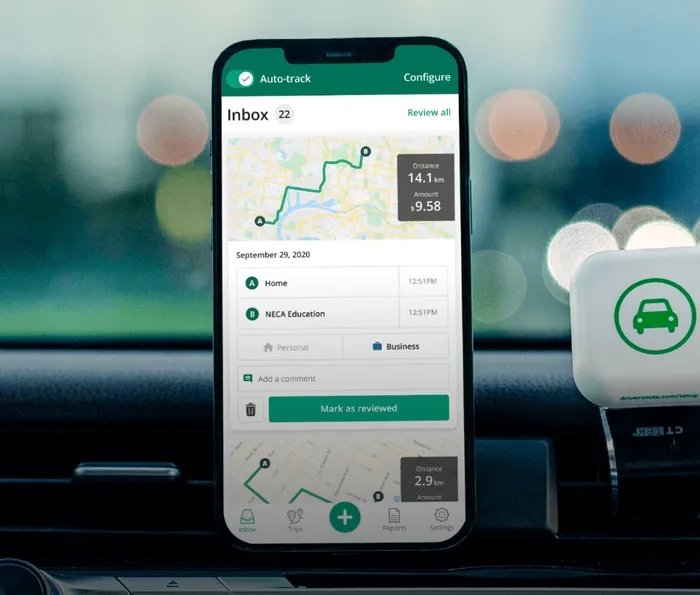
From the first drive, Driversnote runs automatic mileage tracking on your phone’s motion sensors. There’s no method to choose, but you can always add a trip manually later on if you wish.
The optional Driversnote iBeacon sits in one car and starts tracking when your phone comes close, so bus rides and passenger journeys stay out of the log. It still needs your phone with Bluetooth on, and it’s free with a yearly plan purchased on the website.
Classification based on work hours
Give the app your work hours, and it classifies trips inside them as business for you. Anything outside those hours lands in an inbox with a purpose suggested from your earlier trips. You can also split a drive that mixed a client visit with a grocery stop into two trips.
Where the two work alike
Both let you add trips by hand, keep an odometer log, track several vehicles and save frequent places. Both have a web dashboard, though TripLog keeps its own for Premium.
The daily difference is the setup and tracking methods.
IRS mileage reporting methods
The IRS sets out what a US mileage log has to show for every business trip: how far you drove, when, where to and why, written down “at or near the time”. It treats a weekly log as timely.
Each app records those four details for your business mileage while you drive, and our guide covers all IRS mileage log requirements to support your tax deduction.
TripLog’s app exports HTML and CSV, and PDF comes from its web dashboard on Premium. On every Driversnote plan, you get a PDF or an Excel file with one line per trip, showing the date, where it started and ended, the purpose, the distance and the reimbursement at your rate.
One US user with an iBeacon puts it simply: it’s “never been easier to keep a mileage log.”
Applying the IRS mileage rates and custom rates
TripLog attaches rates to activities such as business or charity, brings in new IRS rates through app updates, and keeps custom rates for Premium.
Driversnote applies the current IRS mileage rate by trip date, and each workplace can carry its own rate. A contractor billing two clients at two agreed rates keeps both in one app.
Privacy labels and data usage
TripLog’s App Store privacy label lists only “Data Not Linked to You”: identifiers, usage data, and diagnostics. TripLog’s privacy policy says it doesn’t sell personally identifiable information, and its homepage shows a SOC 2 Type II badge.
The same policy says TripLog collects your phone’s advertising ID and your geolocation, which it treats as non-personal, and stores data on Amazon’s cloud without naming a region.
Driversnote’s label goes the other way. It ties your location, contact details and identifiers to your account, since the log has to belong to you, and it lists no data used to track you across other apps. Driversnote is based in Denmark and acts as the data controller under GDPR.
Both say they won’t sell your data. TripLog’s store label is the leaner of the two, and Driversnote answers to European privacy law.
Is TripLog free, and what does each free plan include?
Free tracking, but gated reporting
Yes. TripLog Basic tracks every trip automatically with no monthly cap, and includes fuel, expense and work-hours tracking. What it holds back is the full report.
Outside a 7-day Premium pass you get once a year from January 1, TripLog says you can pull “the last 7 days in an emailed report on the app only”. Custom rates, location rules, and the web app also require the Premium subscription.
Driversnote’s free plan works the other way round. It reports up to 15 trips a month, but work schedules, custom rates, PDF and Excel reports, and multiple vehicles and workplaces are all included.
| Driversnote | TripLog | |
|---|---|---|
| Free plan | Reports up to 15 trips a month | Unlimited automatic tracking |
| What free leaves out | Unlimited trips, Edit Log, Public API | Full reports, custom rates, location rules, web app, receipt scanning |
| Paid plan | Pro | Premium |
| Billing | Monthly or yearly | Monthly or yearly |
| Priced per | Driver, any number of vehicles | User |
| Tracking hardware | Free iBeacon with a yearly plan bought on the web | Beacon and Drive bought separately |
| Currency | USD | USD |
Either free plan is a good way to see how the app handles a few weeks of your own driving before you pay.
Due to price fluctuation, we did not include exact numbers. Compare current TripLog Premium pricing with Driversnote Pro pricing.
Can you reimburse a team with TripLog and Driversnote?
Yes, both can.
Driversnote Teams handles per-mile reimbursement. Admins collect and approve reports, managers get free accounts, and licenses move between drivers as your team changes. For companies with more than five drivers in their own cars, Driversnote also runs managed FAVR programs. We design the rates, pay drivers each month and check licenses and insurance.
TripLog Teams and Enterprise suit companies running a full reimbursement program. Supervisors approve or reject trips in a queue, approvals can run through several levels, and plans cover cents-per-mile, fixed and variable rate (FAVR) and car allowance programs, with payroll connections such as ADP and Paychex.
Final thoughts
Choose TripLog if:
- Your phone isn’t always in the car, or you want a mileage tracker that works without it
- You want tracking to start with a gig app, your car’s Bluetooth or your charger
- You want fuel, MPG, and expenses in the same app as your miles
Choose Driversnote if:
- You prefer a simpler solution with one tracking method for your business mileage
- You want custom rates and PDF or Excel reports on the plan you try
- Your trips need different rates for different employers or clients
This article is for general informational purposes and isn’t tax advice. Check current pricing and features on each provider’s own site before deciding.
Tired of logging mileage by hand?
Effortless. IRS-compliant. Liberating.
 Auto-track trips
 Classify trips
 IRS compliant reports