
Latest update: August 26, 2026 - 15 min read
MileageWise vs. Driversnote: Choose the Best Mileage Tracker App for You in 2026
A paper mileage log fails in predictable ways. You forget three weeks in March, guess at the distance to a client you visited once, and end up with a record you’d rather not show anyone. Automatic mileage trackers fix that, and MileageWise and Driversnote are two of the options US drivers often shortlist.
Both apps track trips automatically, and both produce a log built for IRS mileage requirements. They differ on timing. MileageWise’s headline features rebuild logs for miles you already drove but never wrote down. Driversnote starts logging from your next drive and keeps going with as little input from you as possible.
This comparison covers tracking, classification, reporting, interface, privacy, and pricing, so you can pick based on how you drive and claim rather than on which feature list is longer.
TL;DR: two apps for two different problems
MileageWise is built around IRS-proof mileage logs, including logs for the past. Alongside its tracker app, it offers an AI Wizard that reconstructs missing trips, an import from Google Maps Timeline, and an IRS Auditor that checks a log against up to 70 logical conflicts before you file. You track in the app during the month, then finalize the log on its web dashboard. It’s sold per vehicle, mostly as annual or multi-year prepaid plans, with a 14-day trial and no free tier.
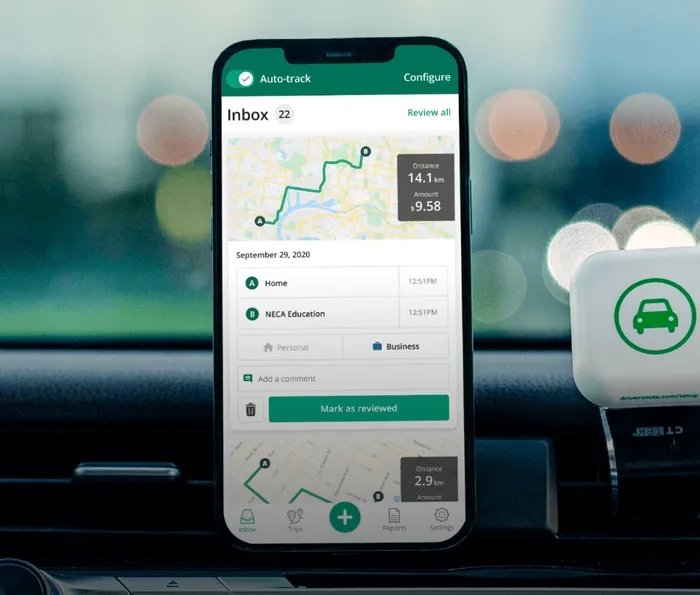
Driversnote does one job: it logs the miles you drive and turns them into a record the IRS accepts. Twelve years in the market, over 4 million drivers, and 4.7 stars from more than 100,000 reviewers. Tracking begins the moment you install it, classifying a trip takes one swipe, and reports export to PDF or Excel with the current rate already applied. Up to 15 trips a month are free, vehicles are unlimited, and there’s a separate Teams product for businesses reimbursing employees.
The short answer
Choose Driversnote for a straightforward, IRS-ready log that builds itself from today onward.
Choose MileageWise if you have gaps in your mileage log.
MileageWise vs Driversnote at a glance
| Feature | Driversnote | MileageWise |
| Best for | Automatic IRS-compliant tracking, going forward | Reconstructing logs for miles already driven |
| Tracking methods | In-app GPS and motion detection; optional iBeacon; manual trip adding | Vehicle movement, car Bluetooth, or phone charge monitoring; manual one-tap logging; Waze integration |
| Setup | Install the app and start tracking, no hardware needed | Install the app, register vehicles, choose a tracking mode, set up the web dashboard |
| Past mileage recovery | Add or edit trips manually | AI Wizard plus Google Maps Timeline import |
| Trip classification | One-swipe business or personal, automatic classification from your work hours, trip splitting for mixed drives | Business or personal classification, with recurring trips, fixed routes and client lists set up in the dashboard |
| Where you finish the job | App or web, whenever you like | Web dashboard, at month |
| Log checking | Reports built to IRS requirements, with edits shown transparently | IRS Auditor checks up to 70 logical conflicts |
| Reporting | One-click PDF and Excel, with the current IRS rate applied and the business/personal split shown | PDF, Excel and CSV from the web dashboard |
| Route detail | Full GPS route recorded | Your choice of door-to-door distance or precise route lines |
| Vehicles | Unlimited, including motorcycles and scooters | Priced per vehicle |
| Data storage | EU servers, Danish company | US servers on Amazon EC2 |
| Free tier | Up to 15 trips per month, free | 14-day trial, no credit card, no free tier |
| Teams | Driversnote Teams, with approver roles, approval flow and reimbursement reporting | MileageWise for Teams, a shared dashboard with admin access control |
| Support | Chat and email support, Help Center | Email and in-app chat support, help articles |
| Typical US app rating in 2026 | 4.7 stars across 100,000+ reviews | 4.7 stars across roughly 600 reviews |
Which app is right for your situation?
Driversnote
Perfect for:
- Anyone who wants an IRS-compliant mileage log without getting overwhelmed by ongoing admin.
- Drivers who switch between vehicles, use rentals, or share a car.
- Self-employed people and freelancers claiming the standard mileage rate.
- Businesses reimbursing employees for using their own cars.
MileageWise
Best for:
- Anyone who needs to reconstruct a mileage log for a past tax year.
- Drivers facing an audit who want a log checked for internal contradictions before filing.
- People who drive predictable routes to the same clients month after month.
- Drivers who’d rather record arrival points than full GPS routes.
- Single-vehicle drivers, since pricing is per vehicle.
How does each app track and classify your trips?
Both apps track automatically. They differ in what triggers a trip and how much cleanup follows.
Driversnote needs no hardware to start
Driversnote uses your phone’s GPS and motion sensors, so automatic mileage tracking works from your first drive in any vehicle. That includes rentals, older cars without Bluetooth, and a car you borrow occasionally.
If you want to record trips in one specific vehicle only, the optional iBeacon sits in that car and triggers tracking when you get in. It keeps bus rides and passenger trips out of your log.
The iBeacon comes free with an annual subscription.
MileageWise: movement, Bluetooth, or phone charging
MileageWise offers three automatic modes. Vehicle movement monitoring detects motion, car Bluetooth monitoring starts when your phone connects to your car, and phone charge monitoring (marketed as Plug’N’Go) starts when you plug your phone in and stops when you unplug it. There’s also one-tap manual logging on arrival, and a Waze integration that pre-records trips.
Each automatic mode has a prerequisite. Bluetooth monitoring needs a car with Bluetooth audio. Charge monitoring needs you to plug your phone in every time you drive. Movement monitoring works anywhere but, like any motion-based method, records journeys where you weren’t necessarily the one driving.
What both apps do equally well
Both cover the essentials: automatic tracking, editable trips, business and personal classification, saved locations and frequent routes, notes and trip purpose fields, and multi-vehicle support.
The daily difference is classification. Driversnote lets you set your work hours so trips inside that window default to business, swipe once to fix anything wrong, and split a single drive when you ran a personal errand on the way home.
MileageWise puts that work in its web dashboard, where you set up recurring trips, fixed routes, and client lists in advance.
If you drive to the same twenty clients every month, the dashboard setup pays for itself. If your week is unpredictable, less setup wins.
Rebuilding a log for miles you’ve already driven
This is where MileageWise does something no dedicated tracker matches, so it deserves a straight answer.
If you drove for business all year and logged almost none of it, MileageWise is built for your situation. Its AI Wizard fills gaps in a log, its Google Maps Timeline import turns location history into trips, and the IRS Auditor then flags internal contradictions before anything reaches your accountant. If that’s your problem, it’s the better tool.
Two caveats before you count on it. Timeline reconstruction only works if you had Google Location History switched on, and Google has moved Timeline to your device with its own retention limits, so the data may not exist. And remember, a reconstructed log is an estimate: the IRS asks you to record expenses “daily or as soon as practicable,” which a rebuilt log by definition doesn’t do. That’s where relying on the AI Wizard tool is somewhat of a risk.
Driversnote lets you add and edit past trips by hand, and shows edits transparently, but it has no reconstruction engine. If your records are current or you’re starting fresh, none of that machinery helps you anyway.
Will your log hold up with the IRS?
Tracking trips is the easy part. The test is whether the record holds up.
Under Publication 463, each business trip needs the date, the miles driven, where you went, and the business purpose. The IRS also expects records kept as you go rather than assembled later.
Our guide to the IRS mileage log requirements covers the detail.
A Driversnote report comes out in PDF or Excel in one click, with your total miles, the business and personal split, the purpose of each trip, and the deduction or reimbursement figure calculated at the current IRS rate. You can run more than one rate, and keep a separate log for each place you work.
MileageWise exports PDF, Excel and CSV from its web dashboard, and adds the IRS Auditor pass that checks for logical conflicts before you file. That check is genuinely useful on a log you assembled after the fact. On a log that tracked itself as you drove, there’s less for it to find.
One thing to verify in either app: the IRS standard mileage rate changed mid-2026, from 72.5 cents per mile through June to 76 cents from July. Your log has to split miles by date to claim correctly.
How much work is maintaining each app, day to day?
Driversnote is built to bring ease to your everyday and take as little manual work as possible. You install it, tracking starts, and classification is a single swipe from the trip inbox. Reports come out of the app or the web app, whenever you want them, and because it works in any car there’s nothing to reconfigure when you change vehicles.
MileageWise splits the work between two places. The app handles tracking and quick logging during the month. The web dashboard is where you set up clients, fixed routes and recurring trips, and where MileageWise recommends you finalize each month’s log. Setup itself is quick, around four steps, but the monthly desktop ritual is real ongoing work.
Whether that’s a cost or a feature depends on you. Some people want a monthly review on a big screen before anything goes to their accountant. Others want to never think about it. Reviewers of both apps report reliable tracking and responsive support. Battery drain is the most common complaint for either, as it is for any app tracking in the background.
What does each app know about you?
This section is less one-sided than you might expect.
Driversnote asks for three things and nothing else: your trips, their distances, and any notes you add. It doesn’t look at how hard you brake, what you spend on gas, or anything your car’s computer knows. It does record the full GPS route of each trip, which is what keeps distances accurate and makes any edit you make visible afterward. As a Danish company, it stores data on EU servers under GDPR, and you can download or delete your data.
MileageWise gives you a choice Driversnote doesn’t: you can calculate distance door-to-door instead of recording a precise route line. Several reviewers specifically value that their location data stays limited to arrival points. If route-level tracking bothers you, that’s a real advantage.
The trade runs the other way on reconstruction. Importing Google Maps Timeline hands over your entire location history, personal movements included, to build a business log. Its privacy policy states data is stored in the United States on Amazon EC2 and treats location data as confidential, but it doesn’t publish a retention period.
So: Driversnote collects a narrow set of data in more detail, under EU rules. MileageWise can collect less route detail, but its most distinctive feature asks for much more. Which you prefer is a judgment call, not a scoreboard.
Pricing models
| Aspect | Driversnote | MileageWise |
| Free tier | FREE (up to 15 trips per month) | 14 day trial |
| Paid plans | Monthly or annual subscription (with a free iBeacon). Teams pricing available | Monthly, annual, or lifetime subscription |
| Number of vehicles | License assigned to an account, unlimited vehicles | One vehicle per account |
| Currency & region | US billing, USD | US billing, USD |
Prices fluctuate, so check the current pricing for both Driversnote and MileageWise before deciding.
Two structural points matter more than the numbers. If you drive two or three vehicles for work, per-vehicle pricing adds up fast. And if you want to test an app across a full tax year before spending anything, a free tier does that in a way a 14-day trial can’t.
Mileage tracking solutions for teams
Both apps can handle more than one driver, but they stop at different points.
MileageWise for Teams is a shared web dashboard built around access control. One admin sees all data and user activity, you can assign several users to one vehicle or let one user manage several, and you can restrict each person to the vehicles they’re assigned to. An admin or accountant then reviews and downloads the finished logs. What it doesn’t describe is an approval workflow or anything that handles reimbursement.
Driversnote Teams adds both. It has admin and approver roles, a submission and approval flow, standard reporting periods, custom company rates, and free licenses for approvers who don’t drive themselves. If you’re reimbursing employees for using their own cars, that’s the structure that saves the month-end chasing.
The importance of recordkeeping
Whichever app you opt for, the useful move is to start before your next business drive rather than next April. The IRS wants a log built as you go, and a mile you didn’t have to remember is a mile you won’t lose.
Our guide to keeping an IRS-compliant mileage log covers what a good record looks like.\
Tired of logging mileage by hand?
Effortless. IRS-compliant. Liberating.
 Auto-track trips
 Classify trips
 IRS compliant reports